From the moment I flutter my eyes awake until the millisecond I drift off into dreamland, I essentially eat, breathe, drink, sip, slurp, embrace and flirt with music. And it’s not just some music, I love it all – music of all genres, shapes, sizes, styles, frequencies, tempos, colors, temperatures. Back when I was younger, I picked my high school based on my purported future basketball career – and I’ll be honest, I really had a good thing going. As an Eighth Grader, I was being recruited by a few Division II colleges. Yeah, I know – DII, but in my defense – I still had braces, didn’t have a drivers license and was far from my first kiss; but, basketball? I could do that. Well, until I couldn’t. My freshman year, I was sidelined with a stress fracture in my L5 and simultaneously discovered my obsession with music history thanks to an exceptional teacher. Sophomore year, as I 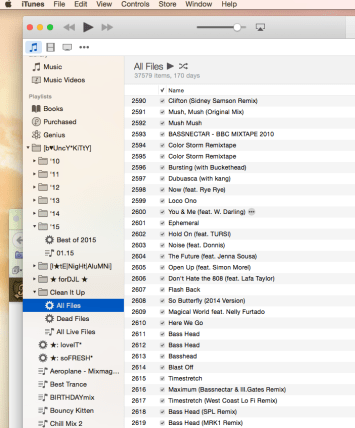 optioned to leave the basketball team – I happily, and swiftly, replaced my basketball scrimmages with choir practices and reciting lines for the school musical. Looking back, it’s almost comical how life’s trajectory can change velocity in a heartbeat. Not to mention, this was right around the time when Napster came into play.
My musical taste expanded with every breath I took and every song that got stuck in my head; I’d scour the internet for unreleased masters, live versions, acoustic versions – of? Well, anything! As much as I ‘appreciate’ (and I use that term vaguely) the radio – it’s a purely commercial market that people are funneling mindless music at ten times the rate of intelligible, honest, legitimate work. So, instead, I use my hunting and pecking skills to scour the internet in search of everything that the Record Labels didn’t want me to hear. Keep in mind, this started when I was a teenager – now that I’m 30 and I’ve been collecting music for the better part of the last two decades, my iTunes library better resembles a game of minesweeper than an actual music library.
There are two basic malfunctions in my iTunes library – ‘Incomplete Information’ and ‘Missing Files’. They’re equally obnoxious but in entirely different ways, but I’d say the later is worse – because your library will literally stop playing when it can’t find your music file. Let’s tackle that first. Besides, do your really want to rename files that you could potentially be deleting? Right; didn’t think so.
Before I started this, I had 43274 songs in my music library – according to iTunes, about 210 days of music (my personal goal is to have 365 days worth…but whatever, that’s for a different time). But, thanks to all of my warning signs – literally, flags – I knew that this wasn’t the case: almost 10% of my library was actually missing or deleted.
Missing Files.
Ever wonder what that annoying ! mark was in the left hand column on iTunes? Well, if you’ve never seen it – you can probably skip this part. But if you’re like me and files are scattered throughout your machine haphazardly, this section will be your bread and butter. Each and every time your iTunes comes across one of these files, the music stops and a dialogue box pops up, asking you to locate the missing music. Sometimes, I know exactly where that Above & Beyond album is sitting, or which single by Griz I needed to link back to my library – but more often than not, I have no damn idea where the files are. The biggest annoyance? Whatever groove I was getting on has been thwarted, and I have to start fresh – and less funky. Thank goodness I found these simple steps to Music Library Liberation.
First things first, the folder up. We’re eventually going to make a hat trick of Playlists, so first let’s make a Playlist Folder to enclose them:
File > New > Playlist Folder
Then, we’re going to make two Smart Playlists and one Static Playlist. From a data doll in the flesh to the rest of you, if you’re not playing around with your Smart Playlists you’re honestly missing out! I have a playlist set to collect data every month, and yearly, for the songs I’ve ranked 4+ so I can have an ongoing ‘Best Of’ Playlist without touching a single thing. You can set filters on filters for the multitudes of metadata each file contains.
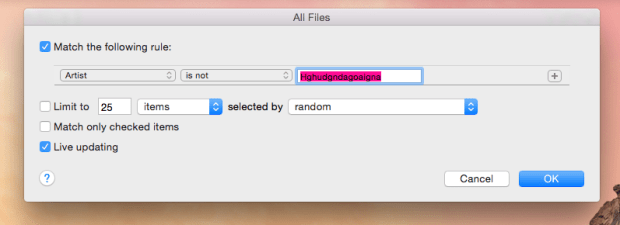
We’re going to be creating two Smart Playlists and they’re going to be working off of each other, like logic statements. The first smart playlist is going to encompass ALL of your music files. And I mean, all of them. To do this, we basically tell our playlist to find all files not made by some fake name – logically, the smart playlist places anything and everything in this folder. Make sure the live updating is on, and there aren’t any file restrictions. If you don’t feel like being creative – you can try using my folder name, unless you have some yodeling music on your computer or something…
File > New > Smart Playlist > “All Files”
 The more I played around with iTunes and sought some solice online, I found an incredibly helpful hint: If you’re dragging a group of songs out of a Smart Playlist and into a regular playlist, iTunes will automatically eliminate all files it can’t locate. That said, let’s tackle the easy playlist – the Static Playlist. Think of this playlist as a bucket; a helpful, musical bucket where we’re going to be moving our files to. Label it ‘All Live Files’
File > New > Playlist > “All Live Files”
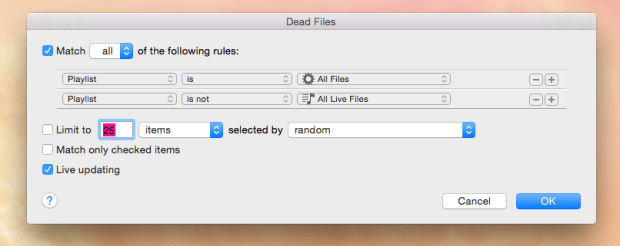
Last, but certainly not least – your second Smart Playlist. This is going to be for your ‘Dead Files’ – we’re going to set this folder up like a sieve, it’s going to collect all the crap data within the application. We want this Smart Playlist to match two rules – we want it to be in the “All Files” Smart Playlist, and we don’t want the files to be in “All Live Files”
File > New > Smart Playlist > “Dead Files”
Head into your “All Files” playlist and select everything – yep, everything (Command + N), right click – and add the files to your ‘All Live Files’ folder.  This could take a few minutes, especially if you’ve got a large library, so go open a cold brew, sit back and let your Smart Playlists do the work. When you get back to your tracks, you should see a pretty folder with no warning flags – and a populated “Dead Files” folder. Go to the “Dead Files”, highlight everything – right click and scroll down to delete. Voila; a cleaned up iTunes Library!
Now, if you’re still in the mood to fill in that missing metadata – make a new Smart Playlist, set ‘Artist’ ‘is’ ‘Blank’ – or, Album ‘is Blank’. Your new folder will have all the files missing information – it’s a long, tedious road to adding it back in (trust me, I’m in the middle of it), but it’s so much easier when your playlists are seamlessly streaming.
 The Bouncy Kitty
You must be logged in to post a comment.