[Tech Tuesday] TomNod – How To Crowd Source a Crisis

Innovative, creative, addictive, mind-boggling, problem-solving and social; modern technology has come a long way over the last quarter century – if not justwithin this past decade.  After Nevada voted to allow autonomous automobiles in 2011,  Google has been feverishly developing a self-driving car technology adorably named ‘Google Chauffeur’.  Championed by the brilliant Sebastian Thrun – director of the Stanford Artificial Intelligence Lab, expert Google Engineer and last but certainly not least the co-inventor of Google Street View, the project is still in closed beta testing mode up at their Mountain View campus.  Since the inception of the application, 3 more states (Florida, California and Michigan) have all put laws into effect allowing self-driving vehicles on the roads. Two years ago, the One Laptop Per Child‘ experiment oversaw the distribution dozens of iPads to a pair of remote villages in Ethiopia. Five months later – without instructions, assistance and only themselves to trouble shoot with- children had learned how to read and write English, and even hack the machines.  And now, thanks to TomNod – even the most disastrous of a crisis is transformed into a resourceful and useful technological tool.
TomNod

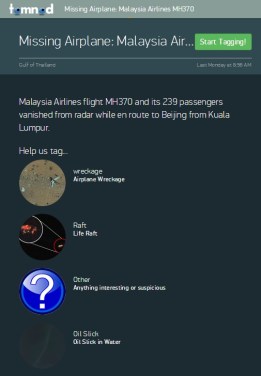
TomNod first made headway back in November during Super Typhoon Haiyan in the Philippines and were soon acquired by Digital Globe; using Digital Globe’s satellite imaging technology, thousands of users from around the world explore real-time maps to solve real-world issues.As of right now, Malaysian  Airlines Flight 370 has been missing from sight, sound and radar since this past Sunday morning.  Until resolved, this event will be the first thing on every flight attendant and pilots mind, an unnerving thought of every conscientious traveler and while every news station, outlet and blog tries to make sense of the calamity.  My first reaction was (and still is) two-fold: (a) I still (at 29) plug my ears while the flight attendants breeze through the security pamphlet; which means the empath inside is shaking in her boots and (b) want to help; somehow, someway.  In the past few years, whenever a global crisis has hit I’ve managed to donate a small bit of what I make; it isn’t much, but it’s more than nothing – and to me, that’s something. So, when my boyfriend leaned over this morning to show me a great way to use, and crowd-source, data – I was all eyes, ears and heart.

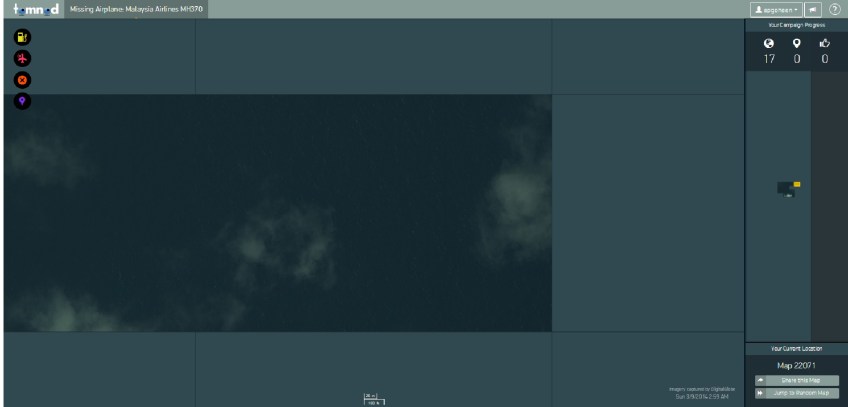
The application is fairly simple – head over to the TomNod page and you’ll get a quick description of the program and a bit of background on the types of anomalies you might come across.  It takes a bit of time to load, but quadrants satellite imagery over the Gulf of Thailand will populate right in front of you.   If you think you’ve found something questionable, click one of the neon stamped circles on the left of your screen.  You’ll then be taken to a new window, where you’ll essentially take your cursor and drop a tag onto the map and don’t forget to add a description.  On the right side of your screen, you’ll see three metrics: the first is the number of quadrants searched, second is how many objects you’ve tagged and finally, how many other sources agree with your tags.  Below, you’ll see a map of how the quadrants you’ve searched stack up in the grand scheme of things.  If you have a few moments to spare, please lend your eyes to the TomNod team and the families of those affected; you never know what kind of a difference you can make until you try.
TomNod2

[Tech Tuesday] 5 Tips and Tricks for the iPhone 5S

Though I wouldn’t say I have a hard time with being wrong, I certainly enjoy being right a lot more frequently – and when it comes to technology, I’ve always felt that I’ve had a keen eye for the latest and greatest toys and gadgets.  For the last five years in Los Angeles, I’ve bounced between LG and HTC Smart Phones – but have consistently run into problems with the OS restarting, and that’s in addition to my contacts being deleted (on multiple occasions).  For the last two years, I’ve been a had an HTC Rezound and what I once found novel, amazing and innovative was suddenly slow, redundant and poorly integrated – especially when compared to my daily use on my former deactivated iPhone 4s that I was using as a Wirelessly enabled PDA.

20140225-155039.jpg

The fact of the matter is that I’m a heavy duty phone user with quick paws and a curious mind, and my Droid simply wasn’t cutting it anymore for my everyday inquiries. For all the reasons and times that I defended my Android in all of it’s customizable glory, the truth is that in the five years that I’ve owned a smart phone I’ve never once decided to root my Droid; in retrospect, I did jailbreak an iPhone or two.  So, when I had the chance to upgrade my phone plan early with Verizon two weeks ago I more than jumped at the chance for something different.  Since then, I’ve managed to migrate from an avid Android activist to a full on iPhone enthusiast – equipped with simple screen shots, emoticons and voice commands.

To make the transition as smooth as possible,  I’ve been scavenging the internet in search of the latest, greatest and most amazing tips and tricks for the 5s and, admittedly, I’ve had a blast doing it.  Without further ado, here are a few of my favorite hacks!

5 Tricks + Tips for the iPhone 5s

      1. Camera: Burst Mode 

There are 3 ways to enter ‘Burst Mode’ – press and hold the shutter key, or either of the volume keys on your phone for a succession of snaps,saved as a burst.  The phone will pick the best of the group to display, but you have to option of browsing through all of them.

      2. Slide iMessages Left for Time-Stamp

For a cleaner look, the time-stamp was eliminated from the standard text message view – however, if you want to reveal what time you sent your last message, simply slide the screen to the left.

      3. Enable Airdrop for Easy File Sharing

When you get to your home screen, slide up for the ‘Toggle’ bar and second from bottom you’ll see a line for ‘Airdrop’ –  you can enable this for your contacts, or anyone in the room with an Apple device.  As a bonus, Airdrop works exceptionally well with the Apple TV device – presenting your iPhone screen on whatever device the ATV is plugged in to.

      4. Customized Alert Vibrations

Not that this was in any way necessary (IMO, at least), but with iOS7 we now have the ability to set customized text, email and alert vibrations – that way, even if your phone’s on silent you’ll be aware of important calls, reminders and meetings.   The phone comes with some standard ones – like ‘Heartbeat’ and ‘S.O.S.’, and below this you have the ability to create your own:  SETTINGS > SOUNDS | Select the Alert | VIBRATION | CREATE NEW VIBRATION

      5. Add an Emoji Keyboard

Okay, granted this isn’t anything novel for past iPhone users – but as an Android user, I was completely amped to finally use some emoticons on Twitter, Instagram and in my text messages.  As with all things iPhone, additional keyboards are easy to add.  Go to the App Store to download something that strikes your fancy, then head to: SETTINGS > GENERAL >  KEYBOARD > KEYBOARDS > ADD NEW KEYBOARD

Last, but not least – I leave you with my new favorite late night habit: Fun with Siri.    Back in the day, when Apple updated their Desktop OS – they’d embed bits of code for the heavy duty computer users to discover that came to be known as ‘Easter Eggs‘ In case you’re not aware, Apple Easter Eggs are to adults what Candy Easter Eggs are to little kids – fun, exciting, and hidden in the most amusing locations.  Unfortunately for tried and true Apple computer fanatics like myself, Steve Jobs did away with the Easter Egg back with OS 9. Thankfully, there are still engineers out in Cupertino that held onto the creative, human aspect of the job and it shows in the most amusing of ways – for example, SIRI.  When I was scavenging the interwebs in search of new and awesome things to do with my 5s, I stumbled upon an amazing Reddit thread with some amazing questions for the

20140225-151534.jpg

20140225-151555.jpg

Wednesday Watercooler

Time is seemingly just skipping on by this year.  I swear just a few weeks ago I was lamenting how it was already summer and now – all of a sudden, fall is upon us. If you take the time and think about it, the older you get the faster time respectively seems to fly -when we’re younger, we have a lot of ‘novel‘ first experiences that stick their roots in us as monumental; as we get older, there are less and less of those unique milestones in our lives.  Think about the first long drive you took – I bet it took forever, but on the way back didn’t it seem like a breeze?  But if you’re one of those people that’s dragging their cute butt through the week, keep reading and maybe this will kick things into a higher gear.

Science

Amidst a considerable amount of controversy, UK based Channel 4 made a daring (and entertaining) move by observing participants under the effect of the recreational club drug MDMA.  The study was designed by David Nutt and Valerie Curran – respectively professors of neuropsychopharmacology (say that five times fast) at Imperial College London and psychology at University College London.  This study, much like a previous study on psilocybin, was conducted both in hopes of observing brain changes via fMRI and in the treatment of mental illnesses like depression and PTSD.  Though not all volunteers will be shown on television, amongst the 26 were Evan Harris, a former member of Parliament, Lionel Shriver, a writer, and actor Keith Allen.  If you’re like me, you won’t want to miss this – watch live this today (9/26) and Thursday (9/27) here.

Football

I can’t say that I’m a huge football fan,  actually it’s one of my least favorite sports – next to the nonsports of professional golf and cheerleading. How-to-the-ever, I know enough football fanatics – including my best friends and parents, that I  definitely can empathize with the current referee situation.   On Monday, the Green Bay Packers faced off with the Seattle Seahawks in what ended up being an unfortunate loss by the CheeseHeads due to some Bone Headed officiating by replacement referees.

The NFL Officials are currently on strike – asking the league to provide thousands of dollars a year toward their pension plan.  Per usual, the owners are being obstinate – hiring abysmal replacement referees and doing the best they can to keep the 2012-13 season in play.  Also to note, the less clothed and talented Lingerie Football League had apparently fired some of the same replacement referees from their own league.

Entertainment

Following in the stellar footsteps of Daft Punk, Skrillex is venturing out of his dubstepbox and doing huge things for himself.  Currently on his plate is the score for the upcoming James Franco movie the Spring Breakers as well as the upcoming Disney movie, Wreck It Ralph.  He’s catching some considerable flack from parts of the EDM world but I think it’s actually pretty neat.  I can’t think of many DJs, beyond Feed Me and potentially the ‘Mau5, that would excel at doing the score for the movie so major Kudos to Skrillex.  And to boot, he gets his own cameo alongside John C Reilly and Sarah Silverman; the cameo isn’t in the trailer below but no matter -it still gets me excited!

Technology

Google Maps is at it again; no, this isn’t an anti-iPhone post – rather, it’s me getting excited about an innovative look at geography. They’ve paired up with the Catlin Seaview Survey to provide amazing underwater maps like the one below.  We all could use a vacation, and now you don’t have to leave your desk to take one – head on over right now to take a gander at sea turtles, coral, schools of fish and sunsets from exotic locations like Australia, the Philippines, and Hawaii.

Tech Tuesday: Can You Find Me Now?

The Ice Cream Sandwich update for my Rezound has mostly been a good thing; my phone boots faster, applications load quickly, Facebook doesn’t force quit in the middle of loading pictures and the OS is a lot sexier.

But the other day, as I was trying to use Verizon Navigator – I noticed a small hiccup with the update.

Any time I attempted to load a ‘Map‘ related application (e.g. Verizon Navigator, Google Maps, Latitude, Places), my phone restart itself.  On the plus side, it’s challenged me to actually know directions instead of being super dependent on technology to lead the way.  Conversely, it’s been pretty damn frustrating because I realized I might not know Los Angeles quite as well as I thought I did.

I did some research on the interwebz and realized that this isn’t a unique issue; quite to the contrary, there have been quite a few complaints and forum threads dedicated to this very issue.

The Bug:

  • Open Map or Navigation App
  • Select Destination
  • System Reboot

The Fix:

Unfortunately, there isn’t a long term fix for this problem.  According to Google’s forums, this issue has elevated status and was given to the product development team.

In the mean time, there is a short term solution:

  • Uninstall Google Maps 6.10 and revert to old version of application (6.9 or 6.3)
  • Toggle the “Automatic Update” button
  • Go ahead and try the app again

And voilà, problem solved!