Tech Tuesday: Instagram Web Profile Preview

Instagram Web Profiles Coming Soon!

The camp over at Instagram Headquarters seems to have been hard at work as of late.  After their billion dollar acquisition over the Summer, I think most people with an eye on either company were expecting big changes on the Facebook mobile end of things.  Specifically, a better camera equipped with filters and a more streamlined uploading system.  What I didn’t expect – but adore – is the upcoming addition of accessible web profiles for Instagram pages.

I, for one, am a huge fan of this idea.  When I started using Instagram last April, the only frustrating thing about the mobile app was that there was no clean or simple way to view a users  picture trail.  For the last six months or so, I’ve been using a great website called Statigram.  At the most basic level it organizes your pictures in a simple fashion, adds categories to pictures and lets the user group their followings however they choose.  It’s also much easier to search for people and hashtags compared to the mobile Instagram application.

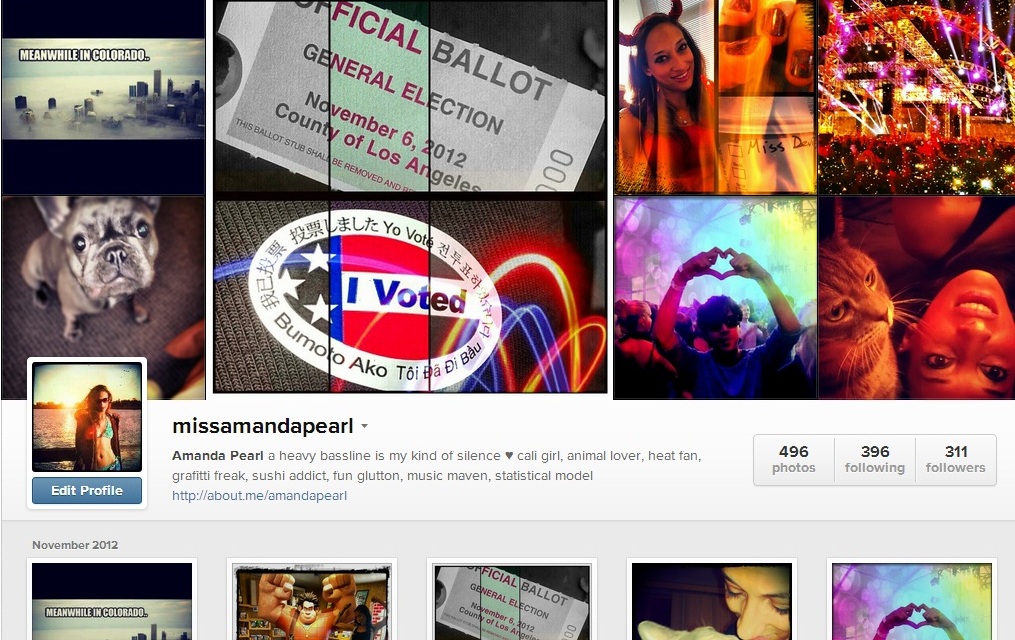
From the looks of it (see  below), the Instagram web profile is a marriage of Statigram and Facebook. The pictures are organized in precisely the same fashion with the images in chronological order; the newest image  first and then time increases as you wind left and down the page.  All other elements of the profile are almost replicated from Facebook: the header image is eerily similar to the cover photo we’re now used, the user photo is in the same exact place, and the tally of photos, following and followers takes the place of the types of elements in our Facebook profiles (Photos, Friends, etc…).

All in all, I’m a huge fan and can’t wait until my profile is rolled out to me! However, over time I’d think maintaining independent Facebook and Instagram profiles would become fairly redundant – especially when they look so damn similar.  It would only make sense that overtime, our Facebook  Timeline would incorporate our Instagram Web Profile, which would then render it obsolete.

Tech Tuesday: Do You Have Klout?

550socialmediavenn

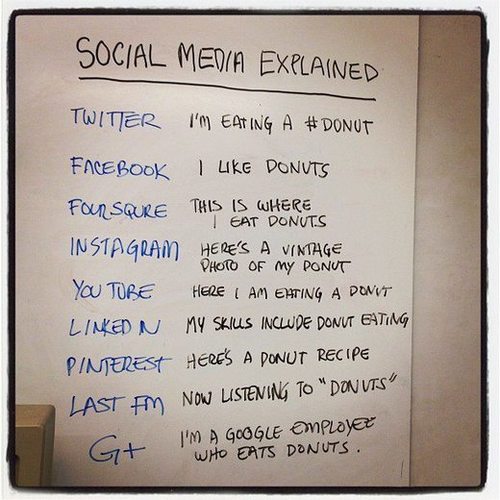
Venn Diagram of Social Media

In this day and age, it’s become slightly tiresome to stay on top of all the Social Media Trends; there are just so many ways you can connect with people that websites can either become redundant, overwhelming or in the most severe cases – both.  Several of my friends coyly admitted that they’ve become discouraged to use social media because it’s just “too much” for them to want to handle (their words, not mine).  And to a point, I completely agree with them.  How you pick and choose your social networking sites is slightly analogous to picking where to sit at lunch during your first day at a new school; your environment, the information you choose to share and the connections you cultivate are all indicative of this choice.  Each Social Media site that I use has their eerie similarities, but also pronounced differences.

Everyone and their mom’s dog has a Facebook and at a very base level understands the purpose: sharing your life and ideas with a predetermined group of people and one rarely exceeds the 420 character limit of a status update.  With the new “Subscribe” option, one could make their Facebook relatively public – but I know very few non-Celebrities that have ascribed to this.

A website like Path is similar to Facebook with the types of things you can share – music, links, photos – but you’re limited to engaging a group of roughly 150 people. Why this number you ask?  Well, I’ll tell ya – it’s because of Dunbar’s Number, which basically states that the number of people one can maintain a social, stable relationships with is somewhere between 100 and 250, but scholars believe it’s at about 150.

And then there’s Twitter – you can elicit control over your audience by toggling whether you want your page public or private; at a basic level, hink of these two options as either the Facebook option or the Path option.  When public, anyone and everyone can read, and search for, your tweets – while private, your tweets are only seen by a select audience that you allow. Twitter is wonderful for being succinct and witty, but any and all responses are limited to 140 characters.

I love examples, so let’s throw a few out:

Let’s say you want to share a link to an important cause (the upcoming election, Superstorm Sandy, adorable kittens, etc)….

  • Do you have an opinion you’d like to share?  If so, something like Path, a blog like WordPress or Tumblr (or Blogspot…or Xanga…or, well, you get the picture) or Facebook is your best bet. If not, you could simply post your link to Twitter with the title of the article.
  • Do you have an audience that you’re trying to reach (or, avoid)?  If you want the biggest reach, I’d lean towards a public Twitter profile;  if you’re only interested in your pre-existing social circle, go for Facebook; and if you want your post to reach a niche crowd, go for Path.

Let’s say you’re out to eat at an amazeballs restaurant and want to share your meal with your friends…

  • Do you want to post a picture of it?  Then navigate towards Instagram – snap your shot and share away at your leisure.
  • Are you eating with long lost friends? Check the group into Foursquare or Facebook – hell, even post that picture you took with Instagram while you’re at it.
  • Did you have the best time ever and want to tell everyone how ridic the food and service were?  Log into Yelp and write a formal review of your swanky time
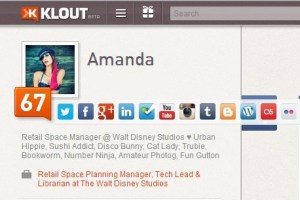
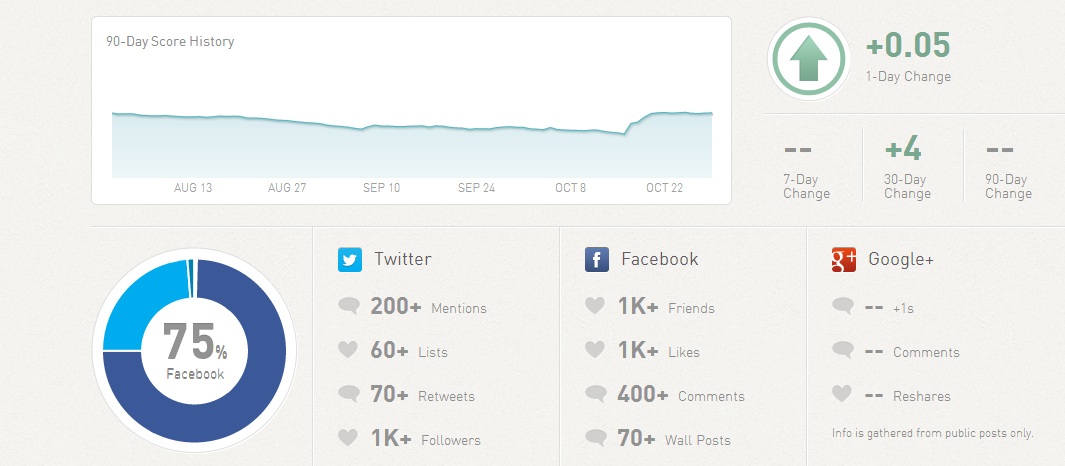
When you’re part of one or two sites – it’s fairly easy to understand the entirety of your audience:  if your Twitter account is private and you don’t allow subscribers on Facebook, you have an excellent idea of who your target audience is when you post.  But what if you’re playing a juggling act with social media accounts here there and everywhere?  That’s when you use Klout.  Klout takes someone from a Social Media Queen to the Social Media Queen Bee by aggregating data from a number of measured social networks

When I joined Klout a little over a year ago, I had no clue what I was getting myself into – and adding another social media site that was an aggregate of the others seemed more than redundant.  But, what I’ve discovered over time is that Klout is to Social Media what Google Analytics is to Webpages.  By factoring in multiple social networks, Klout’s goal is to discover how many other users are engaged with each and every post you make, regardless of the source.  Your Klout score is between 1 and 100 and takes into consideration two factors: the topics you’re considered influential on and your social network (the people that influence you as well as the people that you influence).
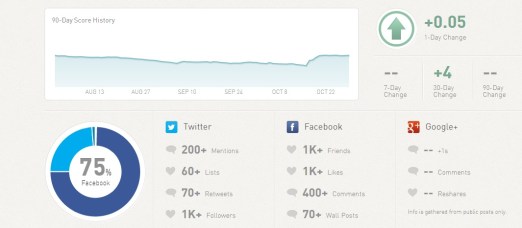
As of today, these are the Social Media Networks that Klout considers relevant (and as a sidenote, I believe because of it – these are also the most important social media sites to be involved with): Twitter, Facebook, Google+, LinkedIn, FourSquare, Youtube, Instagram, Tumblr, Blogspot, WordPress, Last FM and Flickr; however, they’re currently looking to integrate Quora, Yelp, Posterous, Livefyre, Disqus, Bit.ly and BranchOut.

Last, but most definitely not least, there are perks of being involved with Klout.  Those perks aren’t whimsical, idealistic badges (*cough*foursquare*cough*) – they’re actual, tangible, physical, hold them in your hand and covet them Perks and all because you are considered influential!  Below are some of the wonderful ways Klout has thanked me for being a social media maven and I’m beyond blessed to have the opportunity to both enjoy and share them.

Argo Premiere with treats, drinks and delectable snacks!

Fair Trade USA & Klout Perk:
Allegro Whole Coffee Beans
Alter Eco Mini Dark Noir (chocolate bar)
Choice Organic Teas Roobios
Coco Cafe Cafe Latte with Coconut Water and Espresso
Honest Tea Half and Half Organic Tea with Lemonade
Lärabar Chocolate Chip Cookie Dough food bar
Near East Quinoa Blend Rosemary and Olive Oil
Stash Roobios Tea

Klout Perk from Fit Frappe: Samples of each flavor and a huge container of my choosing. Plus, a jumprope!

Tech Tuesday: Apple’s Big Unveiling

I don’t know about the rest of y’all, but I’m a born and raised Apple junkie that only deviates into the world of the PC for work. I’m currently the owner of a gorgeous 27″ iMac, a first generation iPad and a lovely little iPod shuffle that I call ‘Shuffleufagus’; despite being hounded on by about 60% of my friend group, I’m proud to say that I have not (and will not) cave and purchase an iPhone because I’m head over heals for my Droid.  I have gaming systems, I have cable, I have internet – I basically have the entire e-gamut covered, but that doesn’t mean that I don’t have a genuine interest in what those Apple Guru’s will come up with next.

ImageIn attempts to remain competitive across the breadth of the mobile market, today Apple introduced it’s first tablet – set to hit stores on November 2nd.  The iPad Mini comes in around 8 inches and costs a pretty penny – a 16GB mini without a cellular plan comes out to $329 and with one comes out to $459.  It’s weighs roughly .7lbs and is crazily less than 8mm thin.  Conversely, the iPad 2 comes to $399 and the brand new iPad with Retina Display comes in at $499 – both devices are roughly 10 inches tall.  There’s a considerable amount of flack that Apple is receiving – and many are wondering how they can remain competitive in a market where there are euivalent products at a much lower price.  The Amazon Kindle Fire HD, for example, is a seven inch tablet that comes in either a16GB or 32GB version depending on your preference, and respectively costs $199 or $249 – significantly less than the retail of the new iPad Mini.

Fortunately for the Apple camp, there were a few other unveiling today that made the nerd inside me go SQUEE!  A 13 inch Macbook Pro with Retina Display, a MacMini and a new generation of iMac. The new iMacs are being rolled out in two different sizes with 27 and 21.5 inch screens, respectively. I have to say – I’m head over heals for retina display anything; I was playing around on my dad’s new Macbook Pro over the weekend and I kind of fell in love with it.  The design is sleek, sexy and slim – it’s light weight and gorgeous, just the way a laptop should be!

The main selling point of their new laptop and desktop computers is the idea of a ‘Fusion Drive‘ – granted, I didn’t know what one was until the conference, but after doing some digging I think I figured it out. A fusion drive basically the marriage of a solid state drive (SSD) and a magnetic drive (HDD), eventually giving your computer the quickness of having a flash drive and the storage space of a magnetic drive. As I understand it, applications in high rotation will sit on your flash drive so they can be used with ease, but the rest of your files will sit on the magnetic drive to be accessed at your leisure.  The hybrid drive is in no way a new idea, but the Fusion Drive is an example of Apple branding at work. Now, I’m not about to run out and snag myself some new Apple swag – but if a Retina Display laptop happened to wind up under my Christmas tree this year I wouldn’t be at all upset about it…

Tech Tuesday: Add, Detect and Delete

One of my favorite things about having a Droid is, rooted or not, how highly customizable the phone is; from the layout, to the font face and down to the type of smiley face used in a text message – almost everything on an Android phone can be manipulated with ease.  You can go to the Google Play store and perform unique searches for each element you’d like to change.  Or, if you’re feeling super efficient use an application like Zedge, a nice and breezy tool for personalizing your phone, which come with a lovely conglomeration of live wallpapers, ringtones, notifications and games.

Unfortunately, having a highly customizable phone is a double edged sword.  On one hand, there are so many nifty apps that you can essentially make your phone look like anything you’d like.  On the other hand – because there are so many different applications and links downloaded to your phone, you increase the chance of downloading malware, spyware, and adware by roughly 1000% (don’t worry, I’m a statistics major).

A few weeks I decided I wanted a new live wallpaper or two on my phone;  instead of going straight to the Google Play store, I went through Zedge.  I was stoked, too – I had one of those Matrix looking scrolling wallpapers and felt uber high tech.  It wasn’t til about a week later that I noticed my phone behaving strangely.  I would wake up with new applications downloaded to my home screen and wonder if I was “sleep downloading” or if there was a ghost in the machine.  I’d scratch my head in confusion, but wouldn’t get anywhere.  Truly bizarre!  Then came the coup de grâce – instead of receiving normal notifications, I was getting banner ads; ads on my freaking phone.  After a few deep breaths, a beer and some web browsing – I found the culprit: some of the applications I downloaded in hopes of beautifying my GUI were actually feeding me ‘push ads‘ and hindering it’s performance.

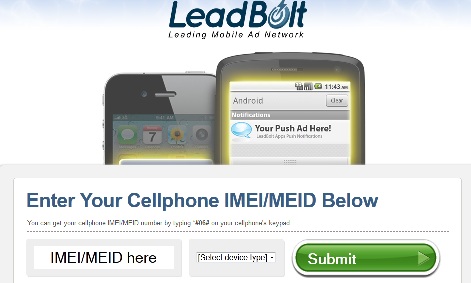
One would think there would be a simpler way to ‘opt out‘ of receiving these ads, but it’s deceptively difficult.  First, when the notifications pop-up there’s a hyperlink that comes with it – only the hyperlink is cutoff typically halfway through, making it harder than necessary to stay calm and carry on.  Secondly, if you’re lucky enough to actually pull it together –  you could be asked to enter your IMEI / MEID number and (a) I don’t know what the hell this is, (b) I don’t know where I’d find it and finally (c) why would I give private phone information to a company that is spamming my phone with ads. Instead, I downloaded a few fabulous and highly recommended applications to keep my phone in pristine condition: AirPush Detector, Lookout Ad Detector,  and TrustGo Ad Detector.

It’s as simple as pressing ‘start scan and the Ad Detector goes to work; analyzing the applications on your phone for suspicious activity and kicking back the results  in a clean, straightforward format.  As it turns out, two of my new live wallpapers – Cheetah Print Live Wallpaper and Zebra Live Wallpaper, were responsalble for the banner ads I was receiving in my notification window while another, Brightest Flashlight Free, was downloading applications without my permission straight to my home screen.  So far, I’ve used the Ad Detector from Lookout Labs – and with a few click throughs, you’re able to go straight to the offending application so you can hit ‘uninstall‘ immediately; amazing!

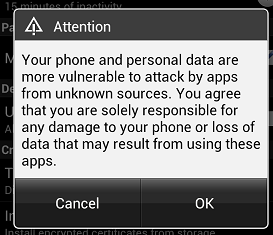
Almost all applications that are amazing on the Droid you can purchase or download from the Google Play store; but here and there, you’ll find something that you think is so rad that you don’t mind it comes from a third party.  The problem is: you should because third party applications are some of the biggest culprits of mobile ads and spyware.  So, to ensure you don’t accidentally download one of them – take this precautionary measure.  In your Android menu, go to Settings > Security and you’ll notice you can toggle the menu for “Installation of non-Market apps”; if you ever choose to allow a third party application, you’ll get the following warning – just remember, it’s there for a reason!

[Tech Tuesday] Socially Savvy

Back in the day, way back in elementary school, my 4th grade class was given the amazing gift of AOL.  In 2012, I’m sure this doesn’t seem that awesome but back in 1994 this was the jam. At the time, they had one of their headquarters in Palo Alto, one of the cities in the Silicon Valley that I grew up in, and I was lucky enough to have a classmate with parents who worked there.  They waltzed into our class one day when we sat down for “computer lab”, which meant walking to the left side of the classroom and pairing up with a group of friends in front of a Mac II, and loaded the application onto our computers.  At the time, we used AOL to talk to participants in the Iditarod. We talked them up about their dogs, the history of the event and how goshdarn cold it must have been. At the end of the day, we got to take home a trial version, which found permanent places in all of our hearts.

As I grew up, so did the social aspects internet.

AOL introduced the “Chat Room” shortly after my parents signed up; I spent an exorbitant amount of time IMing old friends, making new ones,  manipulating my user profile and enjoying their integrated news and media feeds. AOL turned into AIM and my friends and I branched out into blogging on sites like Xanga, LiveJournal and DeadJournal.  MySpace and Facebook became public around the same time in 2003; only Facebook was still an elite social endeavor, rolling out first to Ivy League schools in 2003. In September of 2004, the beginning of my sophomore year of college, UCSB was added and I dove in head first. The social video sharing site, Youtube, emerged in 2005 and  Tumblr, one of the best microblogs around, made it’s first appearance in 2007.

Tumblr was, and in my opinion still is, the best of all social worlds – I could add Videos from Youtube, news articles from whatever source I chose, audio files, photographs and regular posts. I jumped on the Tumblr bandwagon immediately; I purged through my old posts, transferring some, removing others and ultimately deleting my other blogs.  In 2008,  I finally deleted MySpace and picked up one fabulous internet addiction after the other; first came Twitter, then the onslaught of Yelp, Instagram, Hypem, Foursquare, Spotify, Pinterest, etc, etc. Now, in 2012, Social media is more about promoting the individual – whether it’s a person, band or product – and less concerned with connecting individuals into a community.  On both Twitter and Facebook, brands have the ability to pay for – or promote– posts to larger audiences. But,it’s hard to argue with these tactics as a consumer, since these ventures are (relatively) free.

Over time, the number of nuanced networking sites have grown exponentially and older sites have gone on missions to rebrand themselves, with hopes of both gaining new demographics and restoring popularity amongst new and former users.  Unfortunately, we’ve reached a point where the supply and demand for social networking sites is skewed; when you go and “check in”, do you check in on Facebook? Or do you check in on Foursquare or Yelp and integrate it? As a heavy user, it’s a valid question. The market is more or less over-saturated with social media and it’s forced my generation to pick and choose our battles wisely.

Out of my group of friends, I’d say maybe 5% still use MySpace – and that’s a generous 5%; those that use it primarily go for the music and then don’t find a reason to stay.  But there’s a chance that this could all change!  MySpace has undergone extreme rebranding in attempts to reign users (back) in.  The only question is: with all of the social media ventures that have emerged in the time that MySpace was more or less out of the game, will users care enough to cultivate new interest? If I hadn’t deleted my page, I might be willing to go back – but the idea that I’d have to start from scratch is a major deterrent.

Over in the Tumblr camp, they’re preparing to roll out contact analytics to users come November.  Amongst the tracked metrics are – volume, overall engagement of a post, post performance and reblogging. Currently, it’s in beta – but if you want to get your tumbling little paws in on the action, head over to the Union Metrics website and sign yourself up!

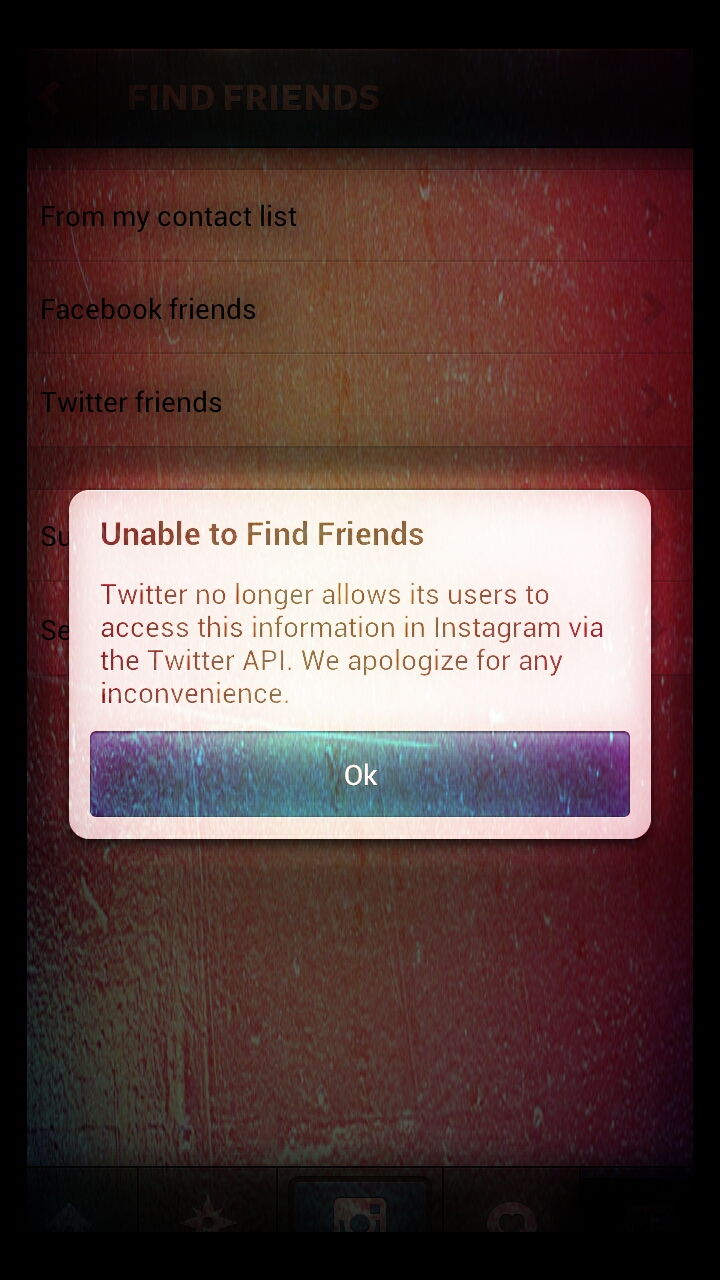
This morning, I was trying to search for a few Twitter friends on Instagram and I was greeted by the following message – “Twitter no longer allows its users to access this information in Instagram via the Twitter API”. Say what?!  Apparently I’ve been hiding under a rock for the last few weeks because this change was implemented back in August.   The good news is that we’re still able to post our pictures to our Twitter account and applications like Foursquare still have API access, but it raises the question – was Instagram banned from the API because they were bought by, and integrated into, Facebook?  Today also marks the launch of the Twitter User Directory, which was added to the bottom of the home page, letting users and non-users alike earch the Twittersphere.

Tech Tuesday: An App a Day keeps the Doctor Away

I’ve always been an Android lover; in fact, I can’t recall ever wanting an iPhone….granted, I’ve also had Verizon Wireless for my entire life so I didn’t exactly have the option of getting an iPhone when it came out…but, I digress.   I’ve watched the Android market evolve and expand over the past few years, and I’m almost in love with what I’ve seen.  The OS has gotten sleeker, potentially even sexier – if you could call an OS sexy, that is. Though the phones have gotten larger in height x length dimension, they’ve also become thinner, lighter and with better quality resolution on the display.  Not to toot the horn for the HTC Rezound, but beepbeep: it boasts the first HD screen for a carried branded phone in the United States.  How you like them apples, Apple?

Now,  originally – one of the great things about the Android phones is the fact that unlike the iPhone – it contains(-ed) Adobe Flash.  I have to phrase it that way because Adobe has decided to discontinue its use after this November, and has started with devices that have already upgraded to Ice Cream Sandwich 4.1  One of the draws of having Flash was that you could view any web page in its full entirety.  But who needs fully supported web browsing when there are so many fantastic  applications for the Droid?!

Sometimes, it can feel overwhelming figuring out which ones you should download. Not to mention, how to handle re-downloading applications after upgrading to a new device. Well, first things first -in the Google Play Store you have the option to view every single application you’ve ever downloaded on your phone.  Simply go to the Play Store, toggle the Menu button (the middle left button on the bottom of your phone) to access the pop-up menu and you’ll have an option at the top called “My Apps“.  Click through and swipe your finger from right to left to see “All Applications.”

The pink oval represents an application that was downloaded in the past, paid for even, yet not reinstalled when I upgraded my phone.  The blue oval is an application that’s currently on my Droid.

Now – onto the fun part, the applications. Some of these are pretty straight forward, especially ones for social media and some deserve a little bit of an explanation. The great thing about the Google Play store, is once your Google account is linked to your phone you can actually pick your applications out online in a more hunt and peck friendly atmosphere, and then send them to download on your phone.  It’s pure genius.

Hit the jump for my should have applications, and anything that is in italic or bold is a “must-have” – enjoy!

Continue reading

What the Wednesday: Tracks on Mars

Today is a big day for the Mars ‘Curiosity‘ rover as it prepares itself for its very first test drive in search for life, the universe, and the number 42.

After considering the not so simple notion that we’re currently, right fucking now, on another planet searching for other forms of existence (pause; geek the eff out), my next thought was this:. If you were operating Curiosity, what would be on the soundtrack to your first ride?

Tracklist:

  1. Kid Cudi – Embrace the Martian (Crookers Remix)
  2. Daft Punk – Robot Rock (Soulwax Remix)
  3. Chuckie – We Can’t Hear Anybody Out There
  4. Boys Noize – Kontact Me
  5. The Bloody Beetroots – Rocksteady (Gigi Barocco Remix)
  6. Fake Blood – Mars (Herve Re-fix)